


WREG
4.1334.00 Reviews
App Specs
- Version
- 510.0.1
- Updated On
- License
- Free
- Downloads
- 100,000+
- Developer
- Nexstar Inc.
- Categories
- News & Magazines
- Platform
- Android
Screenshots
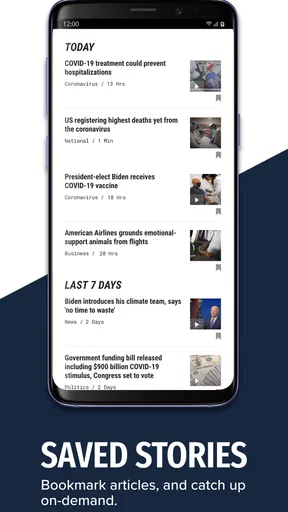
 Analysis by AppCompare
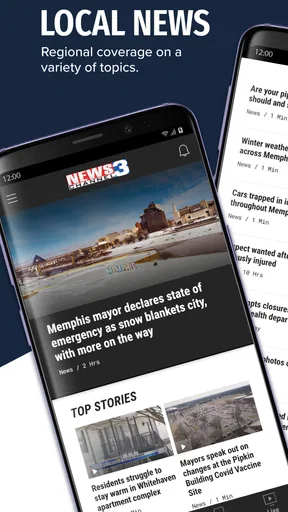
When I want local news without opening a browser and sorting through several sources, I start with WREG. This free News & Magazines app from Nexstar Inc. is built around the Memphis-area WREG news experience, with live coverage, breaking-news alerts, and a steady stream of local reporting. I found it most useful when I needed a quick answer about what was happening nearby rather than a broad national news roundup.
My usual starting condition is simple: I have a few minutes, I want local information, and I do not want to search through social media posts of uncertain origin. The app gives me a more direct route from that need to a news story or live broadcast. It is available for Android devices running at least Android 7.0, and its free price makes it easy to try without committing to a subscription.
That convenience does not mean it replaces every other news tool. I see it as a focused local-news companion rather than a complete national newsreader. If your priority is Memphis-area reporting and urgent local updates, it makes sense. If you want one app that combines many cities, international coverage, long-form analysis, and several publishers, a broader news aggregator will probably suit you better.
From a quick check to a complete local-news routine
I approach WREG as a quick local check first, then decide whether a story deserves more of my attention. This section looks at how that simple habit can turn into a useful routine without making every notification or headline a reason to stop what I’m doing. I’ll also consider where speed matters most and when a broader news source is the better next step.
Opening the app with a specific question
The best way to use WREG is to open it with a purpose. I might be checking whether severe weather is affecting my commute, looking for an update on a local event, or trying to understand why an alert appeared on my phone. That mindset helps because a local station app can feel narrower than a general news platform when you browse without a particular need.
Instead of treating the front page as an endless feed, I use it as a launch point. I scan the leading stories, identify the item that matches my question, and then move into the full report. This is a small but useful habit: it keeps the app from becoming background noise and makes the local focus work in its favor.
The app’s store summary emphasizes livestreaming and breaking-news alerts, and those two functions shape the experience differently. Alerts are designed to bring information to me, while the live stream requires me to open the app and spend time with the coverage. That distinction matters when deciding whether WREG belongs in your daily routine or only during developing events.
Worth Reading Before You Choose

EA SPORTS FC Mobile 26 Is a Bigger Football Game, but It Takes Time

Flipboard Shows What News Apps Must Do Beyond the Feed

Switching to Android Auto Means Rethinking Your Driving Routine

Google Calendar Makes a Crowded Week Easier to Manage

Ludo King Makes the Most of the Minutes Between Plans

Baby Panda World Brings Quick Play to Modern Phones, but Its Game Library Feels Busy
Using alerts without letting them take over
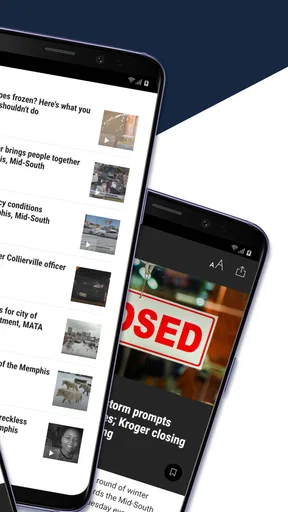
Breaking-news notifications can be valuable when timing matters. A local alert may help me decide whether to leave earlier, avoid a route, check on someone nearby, or follow an event as it develops. The useful workflow is to treat the notification as a prompt for verification, not as the entire story. I open the alert, read the available details, and then decide whether the situation affects me directly.
There is also a trade-off. Frequent alerts can interrupt the day, especially for someone who only wants a quiet morning news check. I would recommend reviewing notification choices during setup and keeping the alert experience aligned with your needs. If you only want major local developments, avoid turning every possible update into an interruption. The app is more helpful when it earns your attention instead of demanding it constantly.
One practical use is to keep alerts enabled during periods when local conditions can change quickly, then rely on the regular app feed at other times. That approach gives the notification system a clear job while leaving the rest of the app for deliberate reading. It is a better workflow than opening every alert immediately and losing track of which details are confirmed, developing, or simply relevant to another part of the viewing area.
Moving from a headline to the full report
After an alert or a quick front-page scan, I read beyond the headline. Local stories often depend on details such as location, timing, affected roads, public instructions, or whether an event is still unfolding. The headline gets me into the right place, but the article is where I can decide what action, if any, makes sense.
This is one of the app’s strongest everyday roles. A local station is closer to the situations that affect routines: school plans, traffic conditions, weather developments, public safety notices, and community events. A national app may mention a major event eventually, but it usually does not give the same local framing. WREG is more useful when the question is not “What is happening in the world?” but “What does this mean around me today?”
I also pay attention to the handoff between a notification and a story. If the alert brings me to a report with enough context, the workflow feels complete. If I still need to search elsewhere for basic local details, the app has only served as a starting signal. That is not necessarily a failure, because developing news changes quickly, but it is an important expectation to set before relying on any station app as a sole source.
Choosing live coverage over reading
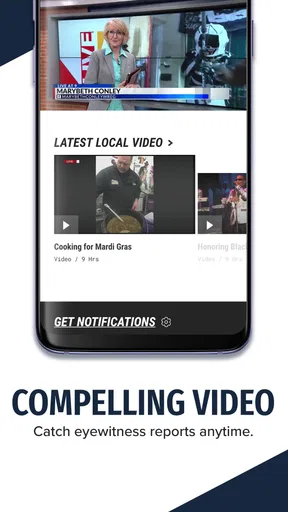
When a story is developing, I prefer the livestreaming option to repeated headline checks. Video can make the situation easier to follow when the value lies in what is happening right now rather than in a finished summary. It can also provide a more natural newsroom-style handoff from the initial update to ongoing coverage.
The live stream is not always the most efficient choice. If I only need one fact, reading is faster and less demanding. Live coverage makes more sense when I want continuing context, a visual explanation, or a current presentation of an event. I would not open it automatically for every story; I use it when the changing nature of the situation justifies the extra time.
For someone watching at home, the stream can become the main destination. For someone checking a phone between tasks, it may be better to read first and save live viewing for a calmer moment. That difference is easy to overlook in a short store description, but it affects whether the app feels lightweight or distracting in daily use.
Handing information from the phone to real life
The most useful outcome is not simply finishing an article. It is making a better decision afterward. I might change my route, contact a family member, postpone an errand, or decide that no action is needed. WREG works best when I use it as a bridge between local reporting and a practical next step.
For example, imagine checking the app before leaving for work after receiving a breaking-news notification. I read the update, compare the location with my route, and use the live coverage if the situation is still changing. If the report affects my commute, I pass the information to anyone traveling with me. If it does not, I close the app and continue the morning without spending time on unrelated stories.
That handoff is where a local-news app earns its place. It is not only about consuming headlines; it is about reducing uncertainty in a specific area. The app cannot make a decision for me, and I still need judgment when details are incomplete or changing, but it can shorten the distance between noticing a problem and understanding its local relevance.
What happens when the workflow breaks
The flow can break in several ordinary ways. An alert may arrive when I am busy, a live stream may be unnecessary for a simple question, or a story may not provide the exact detail I need. Local coverage is also naturally focused: an app centered on WREG is not designed to replace a wide-ranging national or international news service.
Another point of friction is attention. A stream of local updates can be useful during an active news period but less valuable when I am looking for a calm, carefully organized reading list. A general newsreader may offer better control over multiple topics and publishers. A browser may also be faster when I already know the exact story or want to compare several sources side by side.
I would skip WREG if my main goal is personalized coverage from many regions, deep opinion writing, international reporting, or a single unified feed from unrelated outlets. I would also avoid depending on it alone for high-stakes decisions. For urgent situations, I use the app as one source of local reporting and pay attention to official instructions relevant to the event.
How it compares with the usual alternatives
Compared with a national news app, WREG feels more geographically focused and more useful for immediate local context. A national service may be better for broad headlines, business coverage, politics, science, or world events. WREG has a clearer purpose: helping me follow what is happening in the WREG viewing area through local stories, alerts, and live coverage.
Compared with social media, the app gives me a more deliberate path from update to report. Social platforms can surface information quickly, but they also mix firsthand posts, commentary, rumors, and unrelated reactions. WREG is preferable when I want a newsroom-centered starting point rather than an unfiltered conversation. Social media may still add eyewitness perspective, but I would not use it as my only way to understand a developing local event.
Compared with visiting a station website in a browser, the app is more convenient for alerts and repeated mobile checks. A browser can be better when I want to open several tabs, compare reporting, or avoid installing another app. The choice depends on the handoff I need: the app is stronger when information should come to me, while the browser is often better when I already know what I want to search for.
Who will get the most from it
WREG is a good fit for people who live in or closely follow the Memphis area and want local reporting in a mobile format. It is particularly practical for commuters, families coordinating daily plans, viewers who prefer live coverage during developing events, and anyone who wants breaking-news notifications from a local station rather than a national platform.
It can also help former residents or relatives who still need a convenient way to keep up with local events. The value depends heavily on that connection to the area. Without it, the app’s focused coverage may feel limited, because its strength is not the sheer variety of topics but the relevance of local information.
The app carries a Teen content rating, so families should still use their own judgment about which news topics are appropriate for younger readers. News coverage can include serious or upsetting events even when the app is being used for an ordinary daily check. That is another reason I prefer controlled notification habits instead of leaving every update unchecked.
What the app’s adoption suggests, and what it does not
WREG has an average rating of 4.1 from around 1.2 thousand ratings, with over 100 thousand installs. Those figures suggest that it has found a real audience among people looking for this particular local-news experience. I treat the rating as a useful signal, not a guarantee, because the quality of any news app depends on how well its coverage matches my location and habits.
The app has been available since January 16, 2013, and the current version is 510.0.1. That long presence matters to me because a local-news routine benefits from familiarity: I want to know where alerts lead, how quickly I can reach live coverage, and whether the app fits naturally into my morning or evening check. At the same time, a long-running app can still feel less polished to someone expecting the personalization and unified design of a large national platform.
Since it is free, the decision is mostly about attention and usefulness rather than purchase risk. I can test it during a normal week and see whether the local alerts and reports actually help. If they do not match my location or if I prefer a wider mix of sources, uninstalling it is simpler than maintaining a paid subscription I rarely use.
Small habits that make the experience better
I get more from the app when I separate three activities: scanning, reading, and watching. Scanning tells me what deserves attention. Reading gives me details efficiently. Watching is reserved for stories where continuing coverage adds something. Keeping those roles distinct prevents the livestream from becoming the default answer to every question.
I also open the full story before forwarding information to someone else. A short alert can be easy to misunderstand when removed from its local context. Sharing the article or describing the specific detail that affects the other person creates a cleaner handoff than repeating a headline from memory.
Finally, I use the app alongside, not instead of, common sense. If a report affects travel, I allow extra time and reconsider the route rather than assuming the first update will remain accurate. If it concerns safety, I look for relevant instructions and avoid treating a news report as a substitute for direct official guidance. This workflow preserves the app’s value while respecting the uncertainty of fast-moving coverage.
My recommendation after using the complete workflow
After following the process from notification to decision, I see WREG as a focused and practical local-news app. Its free access, mobile alerts, livestreaming, and WREG reporting make it convenient when local timing matters. I especially like the way it can move me from a quick phone check to a fuller understanding without requiring a long search through unrelated sources.
Its limitations are just as clear. It is not the right tool for broad, multi-region news discovery, deep comparison across publishers, or people with no interest in the WREG coverage area. Alerts need thoughtful handling, live video is not always the fastest route to an answer, and developing stories may still require patience and additional verification.
For a friend who wants local news on Android and prefers information that connects directly to everyday decisions, I would recommend trying WREG. I would set it up, adjust the alert habit to match my schedule, and judge it after using it during a real week rather than relying on a single glance. If the local focus fits your life, it can become a useful first stop; if you need a complete news universe, keep a broader alternative alongside it.
Pros
- Live local news
- weather
- and traffic updates in one app.
- Breaking-news alerts help you stay informed throughout the day.
- Video reports and newscasts are easy to access on demand.
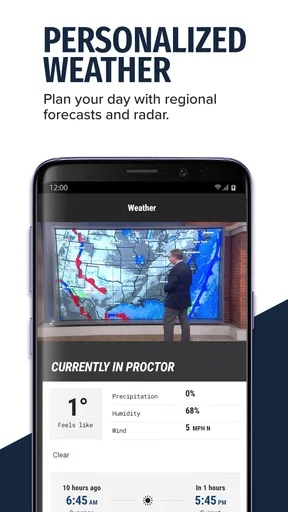
- Weather forecasts include radar views and changing conditions.
- Simple navigation makes the main sections quick to find.
Cons
- Frequent notifications may feel excessive without careful customization.
- Some video content may require a stable
- fast internet connection.
- Advertising can interrupt browsing and video playback.
- Coverage is mainly focused on the WREG local viewing area.
- Certain features may vary by device or app version.
FAQs for WREG
What is WREG and what can I use it for?
WREG is a mobile application designed to give users access to WREG-related content and services from a smartphone or tablet. Depending on the version and your location, it may provide news, weather information, video, alerts, live or on-demand content, and other local features. The exact selection can vary between Android and iOS, so checking the current store description is recommended before downloading.
Is WREG free to download and use?
The WREG app is generally available to download without an upfront purchase, but some features may depend on your internet connection, television-provider access, location, or third-party services. Mobile data charges can apply when streaming video or audio away from Wi-Fi. Users should also review the app-store listing and any linked privacy or service terms to confirm whether advertising, subscriptions, or optional paid content is included.
Does WREG provide live news, weather, or local alerts?
WREG is primarily useful for users who want convenient access to local information, including news updates and weather-related content. Availability of live broadcasts, breaking-news notifications, radar, forecasts, or emergency alerts may depend on regional support and the app version. After installation, review the notification and location permissions so you can choose whether to receive timely updates without granting more access than you are comfortable with.
What permissions does the WREG app require?
The permissions requested by WREG can differ according to the features enabled on your device. Notifications may be needed for breaking updates, while location access can improve local weather or regional content. The app may also use network access for articles, images, and video. Before accepting permissions, read the explanations shown by Android or iOS, and remember that most permissions can later be changed in your device settings.
Is WREG available on both Android and iPhone?
WREG may be offered for both Android and iOS, although compatibility, features, and update timing can differ between platforms. Before downloading, confirm that your device meets the operating-system requirements shown in the relevant Google Play or Apple App Store listing. Users should also verify that the application is officially published by the expected WREG organization to avoid installing an unofficial or misleading alternative.


